Why I Built My Own Outreach Tool

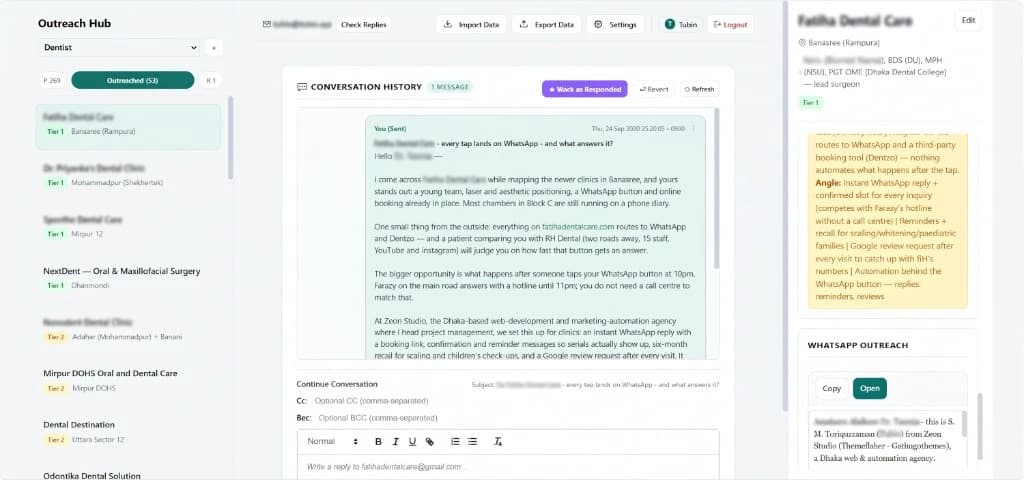
Most off-the-shelf outreach tools solve the easy part: sending a message at scale. They do not solve the work that makes a message worth sending.
The research lives in one document. The lead list sits in a spreadsheet. Drafts are scattered across tabs. Gmail is somewhere else. Then replies arrive, quietly, while the tracker still says “follow up.”
Nothing is technically broken. The system is simply fragmented enough that good work leaks out of it—and the outreach tool is often just one more disconnected tab.
I built the Outreach Lead Review App to close that loop.
It is not a tool for blasting a generic sequence at a list. It is the review-and-outreach layer of a wider AI-assisted workflow: a place where agent-researched businesses, their evidence, and a first message draft are brought together so a human can decide whether and how outreach starts.
The problem was never sending an email
Sending is easy. The difficult work happens before and after:
- deciding whether a business is actually a fit;
- understanding its market, competitors, and current digital setup;
- finding an angle that is specific enough to deserve a reply;
- making sure a sent message does not disappear into an unmaintained sheet; and
- carrying a real conversation forward when a prospect responds.
For local-service outreach, this matters even more. A good lead is not just an email address. It is a business with a location, a customer journey, a website (or no website), a booking process, competitors, and visible gaps that may be worth fixing.
The app brings that context into the same workspace as the outreach itself.
The workflow: agent research, human decision
The workflow has a clear boundary: an upstream AI research agent does the repetitive investigation and first-draft work; the dashboard is where the user retains control of the relationship and the send.
1. Define the lead profile and research scope
The process begins with a predetermined lead profile: the sector, location, business type, qualification criteria, and the type of service or problem worth investigating. A preset scope tells the agent what to collect and assess instead of asking it to chase an undefined list of contacts.
2. The AI agent finds, researches, and analyses qualified leads
The agent collects leads that match the profile and builds a reviewable brief for each one. Depending on the scope, that can include business and owner details, websites and social links, location notes, operating context, source links, competitors, visible growth signals, and gaps in the current digital or operational setup.
The result is more than a name and an email address. It is the evidence needed to decide whether a business is a credible fit.
3. The agent drafts personalised outreach around a real problem
Using the collected evidence, the agent writes a first outreach draft tailored to the business. The aim is to point to a specific, observable issue—not to force a generic template into a few merge fields.
That might be a weak booking journey, inconsistent business information, an unclaimed profile, poor conversion from a website or social channel, or a manual process creating friction for customers. The research output is fed into the dashboard as structured lead data; the email and WhatsApp drafts remain editable on the lead record.
The point is not to automate away judgment. It is to give the user strong, evidence-based material to judge before contacting anyone.
4. The dashboard is the approval gate
Only after research, analysis, and a draft are complete does the lead enter the dashboard. Here, the user can review the lead brief, check the evidence and proposed angle, edit the copy, and decide whether the lead is worth pursuing.
The human is not removed from the workflow; the human is placed at the only decision that matters: whether this message should be sent to this business.
5. Initiate outreach by email or WhatsApp
Once approved, the user can initiate outreach through the appropriate channel: email through the connected Gmail account, or WhatsApp where that is the more natural way to begin the conversation. For WhatsApp, the dashboard opens a pre-filled click-to-chat message, keeping the final send inside WhatsApp itself.
A configurable email signature keeps new outreach and replies consistent with the sender and business behind them.
6. Makes pipeline status visible
Each lead moves through a simple operational state:
Pending → Outreached → Responded
That sounds basic. It is also the difference between a list and a pipeline.
The dashboard makes it possible to filter leads by module and status, review the next lead, and see where attention is required. If a lead is marked as responded, it should become a conversation to handle—not another row to scroll past.
7. Checks replies and preserves conversation context
The hub can check the connected Gmail inbox for replies and update matching leads when a response arrives. For a selected lead, it can also load the email conversation so that replies can continue in context rather than starting a second, disconnected thread.
That is the workflow I wanted: research → considered first message → delivery → response → real conversation.
Not research → send → hope.
8. Supports repeatable operations without locking the data away
Outreach categories can be organised as modules—for example, by industry or campaign. Leads can be imported from CSV or JSON, and exported again when needed.
That makes the tool useful for structured research projects without turning the database into a dead end. The workflow is repeatable; the data remains portable.
Why I did not use an off-the-shelf outreach tool
There are plenty of established outreach platforms. I did not need another mail-merge engine.
Most off-the-shelf tools are designed around campaign scale: upload contacts, build a sequence, personalise a few fields, and maximise sends. That model is useful when the list is clean, the offer is standardised, and volume is the strategy.
That was not the workflow I needed.
I needed an agent to work from a predetermined lead profile and a defined research scope—then collect evidence, analyse each business, identify a credible problem, and draft a message around that problem. A useful lead record may include website and map links, more than one contact channel, business and owner context, source notes, local competitors, a specific digital gap, and a tailored angle.
A conventional sequencer usually treats that depth of context as an awkward collection of custom fields. I wanted the evidence, the analysis, and the draft together on one review screen—not flattened before being pushed into a generic sequence.
I also wanted a workflow with an explicit human approval gate:
- an AI-created lead dossier, not a detached contact row;
- a personalised first draft based on observed business problems;
- one place to inspect and edit the research and copy before contact;
- user-initiated outreach by email or WhatsApp;
- a visible status from pending to outreach to response; and
- Gmail-based delivery and conversation context in the same process.
Could an off-the-shelf platform be configured to do parts of this? Probably. But configuration is not the same as fit. I would still be shaping the work around somebody else’s campaign model: agent research in one tool, lead data in another, and approval somewhere else.
Building a focused internal product gave me the workflow I wanted: AI-assisted research first, human review before send, and an accountable record of what happens after.
The principle behind it: relevance is the automation
There is no shortage of outreach software that promises more volume.
Volume is rarely the constraint. Relevance is.
A prospect does not care that you can send thousands of messages. They care whether you understood their business well enough to identify a problem they recognise—and whether you can credibly help solve it.
That is why the app is designed around lead review rather than a send button. The useful leverage is not sending a message faster. It is reducing the distance between evidence and action.
Built for accountable outreach
I build software to remove manual, error-prone work—not to remove responsibility.
That means using this kind of system carefully:
- research before contacting someone;
- make the message relevant and concise;
- send at a human pace;
- keep a clear record of what was sent and what came back;
- respect a “not interested” response or an opt-out immediately.
The objective is not to manufacture attention. It is to start fewer, better conversations.
What comes next
The first version is already doing the essential work: turning a defined lead profile and research scope into agent-collected lead briefs, personalised drafts, a human review queue, user-initiated outreach, and reply tracking in one place.
Like the finance tools I have built, it began with a simple question: why is this useful work still being held together by copy-paste?
The answer, again, was to build the system I wanted to use.
If your team has good leads but a fragmented process between research, outreach, and follow-up, let’s map the workflow. The goal is not another dashboard. The goal is a process that makes it harder for good opportunities to fall through the cracks.
ACCA-qualified. I build finance software for Bangladeshi businesses, and web products for founders and agencies. Creator of Bari Shamlai.